Baby Games: Piano & Baby Phone
- 4.4
- Rating
- 50.00M
- Installs
- Free
- Price
 Analysis by App-foxy
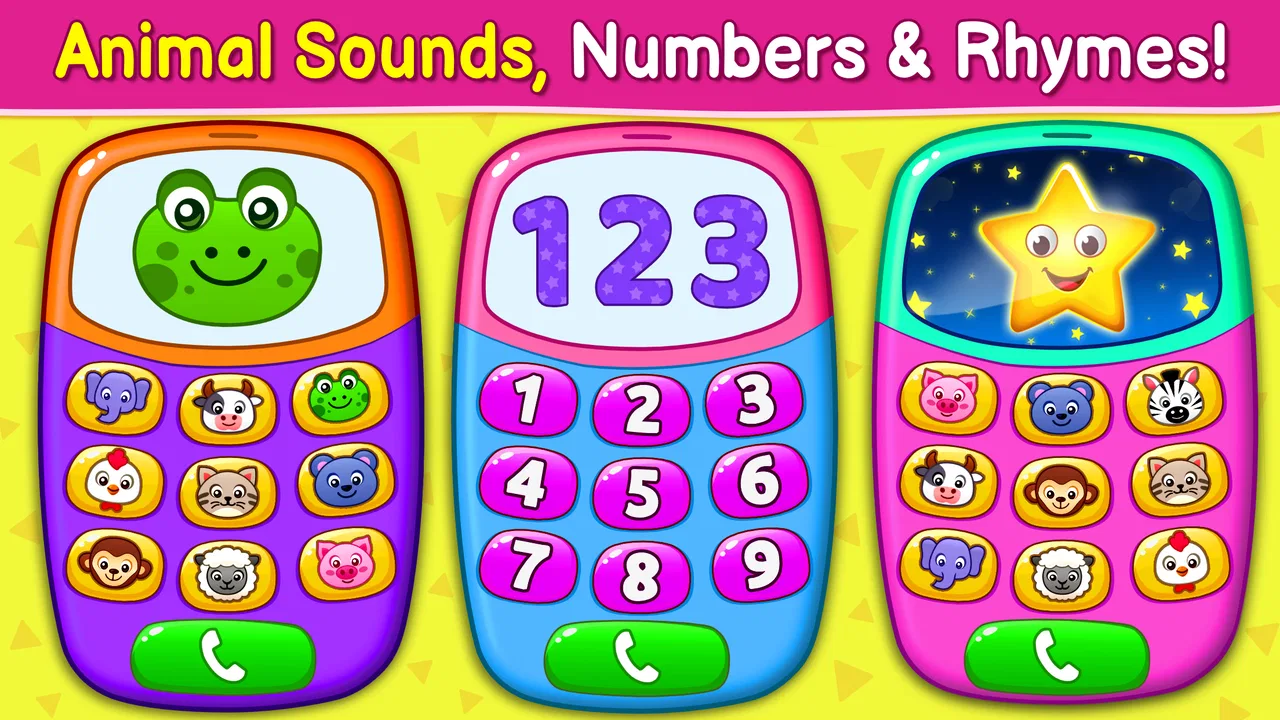
I spent time with Baby Games: Piano & Baby Phone as a simple touch-and-play activity for young children, and its appeal became clear almost immediately: it turns a phone or tablet into a small collection of playful distractions without asking a child to understand complicated rules. The game sits in the educational category, but I would describe it more accurately as an early-learning play space built around sound, color, tapping, and familiar nursery-rhyme ideas.
That distinction matters. This is not an app I would choose for structured reading practice, mathematics, or a lesson with measurable progress. I would choose it when I want a toddler to explore safely and independently for a few minutes, or when I want to join in and turn a short play session into a conversation about instruments, sounds, numbers, or everyday objects. It is free, rated for Everyone, and made by RV AppStudios, which makes it easy to try without treating the download as a major commitment.
How the everyday play session works
The basic workflow is pleasantly direct. I open the game, hand over the device, and let the child begin by tapping the large, obvious elements on screen. The piano-style activity is the clearest starting point because each touch produces an immediate musical response. A child does not need to read instructions before understanding that tapping changes what happens.
You May Also Like

 Blood Strike: 2.5 Anniversary
Blood Strike’s Loadouts Turn Every Drop Into a Tactical Gamble
A close look at Blood Strike’s custom loadouts: how fast access to signature weapons reshapes its battle royale rhythm, rewards preparation, and narrows the gap between fights.

 Pandora - Music & Podcasts
Pandora’s Music Is Easy to Start, but Harder to Recover
Pandora’s strength is its low-effort path from a seed to a station. Its weak spot is how much confidence it asks you to place in connection, setup, and quiet recovery.

 8 Ball Pool
 Is Built on Rivalries, Rematches, and Routine
A close look at the rivalries, rematches, shared routines, and unanswered safety questions that turn a quick pool match into a persistent mobile community.

 Samsung Music
’s Quiet Strength Is Playing What You Already Own
Its reach comes less from spectacle than from dependable access to a personal library. That simplicity is both the app’s strongest retention engine and its ceiling.

 AccuWeather: Weather Radar
AccuWeather Review: A Quick, Clear Forecast for Everyday Decisions
For everyday plans, the best forecast is the one you can understand quickly. AccuWeather makes rain timing, radar, and local conditions easy to act on, with a few trade-offs.

 Hill Climb Racing
Why Hill Climb Racing Still Turns Crashes Into One More Run
A tiny car, a bumpy hill and one more upgrade: Hill Climb Racing keeps resurfacing because its simple chaos makes every near-miss feel personal.
More From Our News Desk



From there, the musical instruments and nursery-rhyme activities give the session a little variety. I found that this works best when I treat the app as a short sequence rather than expecting one activity to hold attention for a long time. A few minutes of piano play can lead into a rhyme, then into a pretend phone interaction. The change of activity helps prevent the experience from feeling like one repetitive screen.
The baby-phone idea is especially useful for children who enjoy copying adults. Instead of presenting a formal exercise, it gives them a familiar pretend-play frame. I can ask a child to “call” a family member, name what they see, or take turns tapping. That turns passive screen time into a small social activity, even though the app itself remains very simple.
The best results come from using the game as a prompt for interaction, not as a digital babysitter. When I sit nearby and respond to the sounds, ask which instrument they heard, or repeat a nursery-rhyme phrase, the app has much more educational value. Left completely alone, it is still entertaining, but the learning element becomes less intentional.
Who gets the most from it
This game is a good match for toddlers and preschool-age children who are still learning cause and effect through touch. It also suits families looking for a low-pressure first music app. There is no need to understand a complicated scoring system, remember a sequence, or compete against a timer. A child can simply tap, listen, watch, and try again.
It can also be useful during small everyday transitions. I could imagine using it while waiting for an appointment, during a quiet moment before dinner, or on a short journey when a child needs a familiar activity. The important word is “short.” Its design supports quick bursts of play better than a long, planned learning session.
Older children who want challenges, puzzles, progression, or more control over music will probably outgrow it quickly. It is not a substitute for a proper instrument-learning app, a phonics program, or a curriculum-focused educational game. If your child already expects levels, goals, unlockable content, or detailed feedback, this may feel too basic.
What I would check before handing over the device
Because the audience is very young, I would prepare the device before starting. I would lower the volume to a comfortable level, close unrelated apps, and make sure the child is holding the device in a way that does not invite accidental taps outside the game. These are ordinary habits, but they make a noticeable difference when the player is too young to manage the device independently.
I would also test the activities myself first. That is not because the controls are difficult; they are deliberately accessible. It is because an adult can quickly decide which activity fits the child’s mood. A child who wants to make noise may prefer the piano, while a child who is tired may respond better to a familiar rhyme. Choosing the starting point saves frustration and keeps the session calmer.
The game’s current version is 2.0.9, and it runs on Android devices using version 6.0 or later. That makes it suitable for many older phones and tablets, which is helpful if you keep a spare family device for children. I would still check the actual device experience before a trip or waiting-room visit, particularly if the screen is small or the speaker is weak.
The Everyone content rating is reassuring for the intended audience, but I would not interpret that as a reason to remove supervision entirely. Age ratings describe the general nature of the content; they do not replace a parent’s judgment about volume, duration, device handling, or whether a child is ready to use a touchscreen.
Small habits that make the activities more useful
One useful habit is to give the child a single goal without turning the session into a test. I might say, “Can you find a sound you like?” or “Let’s make a little tune together.” This gives direction while preserving the freedom to explore. If I ask for a correct answer every time, the activity becomes less playful and may discourage experimentation.
Another good approach is to repeat the same activity on different days but change the conversation around it. On one day, I might focus on loud and quiet sounds. On another, I might name colors or ask the child to copy a rhythm. The app remains the same, but the adult-led prompt changes, which helps avoid treating the game as a one-use novelty.
I also found that turn-taking works better than grabbing the device back whenever the child becomes distracted. I can play a short pattern, let the child imitate it, and then switch roles. This creates a simple routine that uses the piano as a shared instrument rather than just a button board. It is a small adjustment, but it makes the experience feel more purposeful.
For nursery rhymes, I would avoid expecting the child to sit silently and watch from beginning to end. Young children often learn more when they join in, move, or repeat a word. If the rhyme becomes background noise, I would pause the session and return later rather than increasing the volume or pushing for longer use.
Where the simple design helps—and where it stops
The strongest part of the game is its low entry barrier. A child can understand the central action by trying it once. That is a better design choice for this audience than menus filled with text or instructions. The combination of piano play, instrument sounds, nursery rhymes, and pretend phone activity gives parents several starting points without making the app feel like a large platform.
Its simplicity also makes it suitable for shared play. I do not need to explain a scoring system or correct mistakes. I can sit beside a child and turn each activity into a conversation. For families who want a gentle introduction to interactive learning, that is more valuable than a crowded app with dozens of unrelated modes.
There is a trade-off, though. The same lack of complexity that keeps the game approachable also limits replay value. Once a child understands the main tapping interactions, there may not be much new to discover without an adult adding a fresh challenge. The app can support repeated routines, but it does not appear to be designed around a deep progression path.
This is also why I would compare it with alternatives carefully. A nursery-rhyme video app may offer a broader catalog of songs, but it is usually more passive. A dedicated piano app may provide more musical control, but it can be too demanding for a toddler. A structured preschool learning app may teach more specific skills, but it often includes instructions, rewards, and navigation that are less immediate. This game occupies the middle ground: more interactive than watching, less demanding than formal learning software.
Parents should also think about the child’s sensory preferences. Sound is central to the experience, so a child who enjoys musical feedback may stay engaged, while a child who is easily overwhelmed by repeated noises may need shorter sessions and a lower volume. The game is not a quiet puzzle, and it should not be treated as one.
The free price is one of its practical strengths. I can try it with little financial risk, and the large audience indicates that it has found a broad place among families: it has passed 50 million installs, with an average rating of 4.4 from around 57 thousand ratings. Those figures do not guarantee that every child will enjoy it, but they do suggest that the basic concept works for many households.
The release date of April 1, 2019, also helps set expectations. This is an established children’s game rather than a brand-new experiment. I would approach it as a familiar, straightforward activity, not as a cutting-edge learning environment. That is perfectly acceptable if your priority is ease of use, but it matters if you are searching for the newest teaching methods or highly adaptive content.
Questions I would answer before recommending it
If you are wondering whether a child can use it without reading, my answer is generally yes for the core interactions. The activities rely on recognizable visual elements and direct tapping rather than long written explanations. I would still introduce it once with the child, because showing where to begin is faster than expecting a very young player to explore every screen alone.
If you are asking whether it teaches real musical technique, I would say no—not in the sense of replacing lessons or a keyboard tutor. It encourages listening, tapping, imitation, and playful sound exploration. Those are useful early experiences, but they are different from learning notation, finger placement, rhythm theory, or a complete song.
If you want to know whether it works for independent play, it can, but I would keep that independence brief and age-appropriate. The controls are simple enough for a child to explore, yet the best learning moments still come from an adult asking questions or joining the activity. I would not install it with the expectation that it will manage a child’s attention for a long period.
For a family deciding between this and a more advanced educational app, I would use the child’s current ability as the guide. Choose this one when immediate touch response and pretend play are the priority. Choose a structured alternative when you need letter recognition, counting practice, progress tracking, or a clear lesson sequence.
Finally, if you are deciding whether it is worth keeping installed, I would watch how the child returns to it. If they repeatedly use the piano to invent sounds, sing along with the rhymes, or invite you into the phone activity, it has a useful place in the household. If they only tap rapidly for noise and lose interest after one session, another type of game may be a better fit.
My verdict after using it as a parent’s tool
I see Baby Games: Piano & Baby Phone as a dependable first-step activity rather than a complete early-learning solution. Its value comes from being approachable, free, and easy to turn into shared play. The piano and instrument activities give children immediate feedback, while the nursery-rhyme and phone-style elements add familiar themes that can support imitation and conversation.
My main recommendation is to build a repeatable routine around it: prepare the device, choose one activity, set a short play window, and add one simple question or turn-taking rule. That approach gets more from the game than letting a child jump randomly between screens. It also makes it easier to notice when the child has had enough.
I would recommend it to parents of toddlers and preschoolers who want a gentle, music-centered game with no purchase barrier. I would skip it if I needed advanced teaching tools, detailed progress reports, or substantial challenges for an older child. Within its narrow purpose, though, it does that purpose well. It is at its best as a small, supervised play instrument that turns a few spare minutes into tapping, listening, singing, and pretending.
RV AppStudios has kept the experience focused enough for young users, and the current 2.0.9 version remains accessible on Android 6.0 and newer. I would install it for short shared sessions, not unlimited screen time, and I would judge it by the quality of the interaction it encourages rather than by how long it keeps a child occupied.
FAQs for Baby Games: Piano & Baby Phone
01What age group is Baby Games: Piano & Baby Phone suitable for?
Baby Games: Piano & Baby Phone is designed for infants and toddlers, specifically targeting children aged 6 months to 3 years. The app's features and games are crafted to be simple, engaging, and educational, making it an appropriate choice for early learning and development.
02Does Baby Games: Piano & Baby Phone have educational content?
Yes, Baby Games: Piano & Baby Phone includes a variety of educational content. The app combines fun with learning, offering activities that help develop motor skills, color recognition, and musical rhythm. It's designed to enhance cognitive abilities while keeping children entertained.
03Is Baby Games: Piano & Baby Phone safe for my child to use?
Safety is a priority for Baby Games: Piano & Baby Phone. The app includes parental controls and is free from advertisements that could lead to external links or purchases. It is specifically designed to create a safe, child-friendly environment for young users.
04Does Baby Games: Piano & Baby Phone require internet access?
No, Baby Games: Piano & Baby Phone does not require an internet connection to function. This allows your child to enjoy the app anywhere, anytime, without the need for Wi-Fi or data, making it perfect for use on-the-go or in areas with limited connectivity.
05Are there any in-app purchases in Baby Games: Piano & Baby Phone?
Baby Games: Piano & Baby Phone offers a free version with basic features, but some premium content may require in-app purchases. These purchases unlock additional games and features to enhance the experience. Parents can control these purchases through device settings to prevent unauthorized transactions.
Pros
- Engaging and colorful interface.
- Easy-to-use for toddlers.
- Promotes cognitive development.
- Variety of mini-games included.
- Supports multiple languages.
Cons
- Contains in-app purchases.
- Ads can be distracting.
- Limited free content.
- Requires internet for some features.
- Sound effects can be repetitive.

Baby Games: Piano & Baby Phone
Gallery